Ubuntu Pro Finds a Streamlined Home in the Security Center
With the release of Ubuntu 26.04 LTS, Canonical has made a notable change to the desktop experience: the familiar Software & Updates utility is no longer included by default. Instead, all Ubuntu Pro settings have been relocated to the Security Center app. This shift raises a natural question: has the setup process become any simpler? The answer, for the most part, is yes—and the improvements go beyond mere convenience.
A New Home for Ubuntu Pro
The Security Center now serves as the central hub for managing system security and subscription services. Previously, you had to navigate through Software & Updates and then click over to the Ubuntu Pro tab—a workflow that felt cramped and sometimes confusing. The new layout is noticeably more spacious. Each toggle and option is accompanied by a concise, plain-language explanation of what it does. This reduces guesswork and makes the interface more approachable, especially for users who aren't deeply technical.

The range of available options remains identical to what was offered in the old Software & Updates > Ubuntu Pro tab. The difference is purely in presentation: less clutter, more breathing room, and better guidance embedded right alongside the controls.
Free for Personal Use, Flexible for Businesses
One of the most appealing aspects of Ubuntu Pro is that it remains free for personal use on up to five devices. This makes it a low-risk upgrade for individual users who want to enjoy extended security updates and additional compliance tools on their laptops or home servers. For businesses, enterprises, or anyone managing a fleet of Ubuntu installations, a paid subscription is required. The subscription tiers scale with the size of the deployment, offering a clear path from a single device to hundreds or thousands.
The free tier is easy to activate: you simply sign in with an Ubuntu One account and attach up to five machines. No credit card needed. For larger deployments, the Security Center provides a direct gateway to manage subscriptions or link existing enterprise accounts.
Enrolling in Ubuntu Pro via Security Center
The enrollment process has been streamlined. In the old interface, users often had to hunt for the right button or paste a token manually. Now, the Security Center presents a clear, step-by-step (or near-step-by-step) path:
- Open the Security Center from your app grid or system menu.
- Click on the Ubuntu Pro section—it’s prominently placed.
- You’ll see options to sign in with an Ubuntu One account or enter a subscription token.
- If you’re on the free tier, signing in automatically attaches the current device (up to your five-device limit).
- For paid subscriptions, entering a token links the machine to your organization’s entitlement.
The interface provides immediate feedback: you can see the subscription status, remaining device slots, and expiration dates directly on the same screen. No more digging through multiple windows to confirm your Pro status.
Comparing Old vs. New Setup Experience
To appreciate the change, it helps to recall what the old process felt like. Software & Updates served many purposes—managing repositories, updates, authentication, and third-party drivers. The Ubuntu Pro tab was tucked away amid that noise. Users reported that it was easy to overlook, and the layout used narrow columns that truncated descriptions. In contrast, the Security Center dedicates an entire dedicated panel to Ubuntu Pro, with large, readable text and intuitive controls.
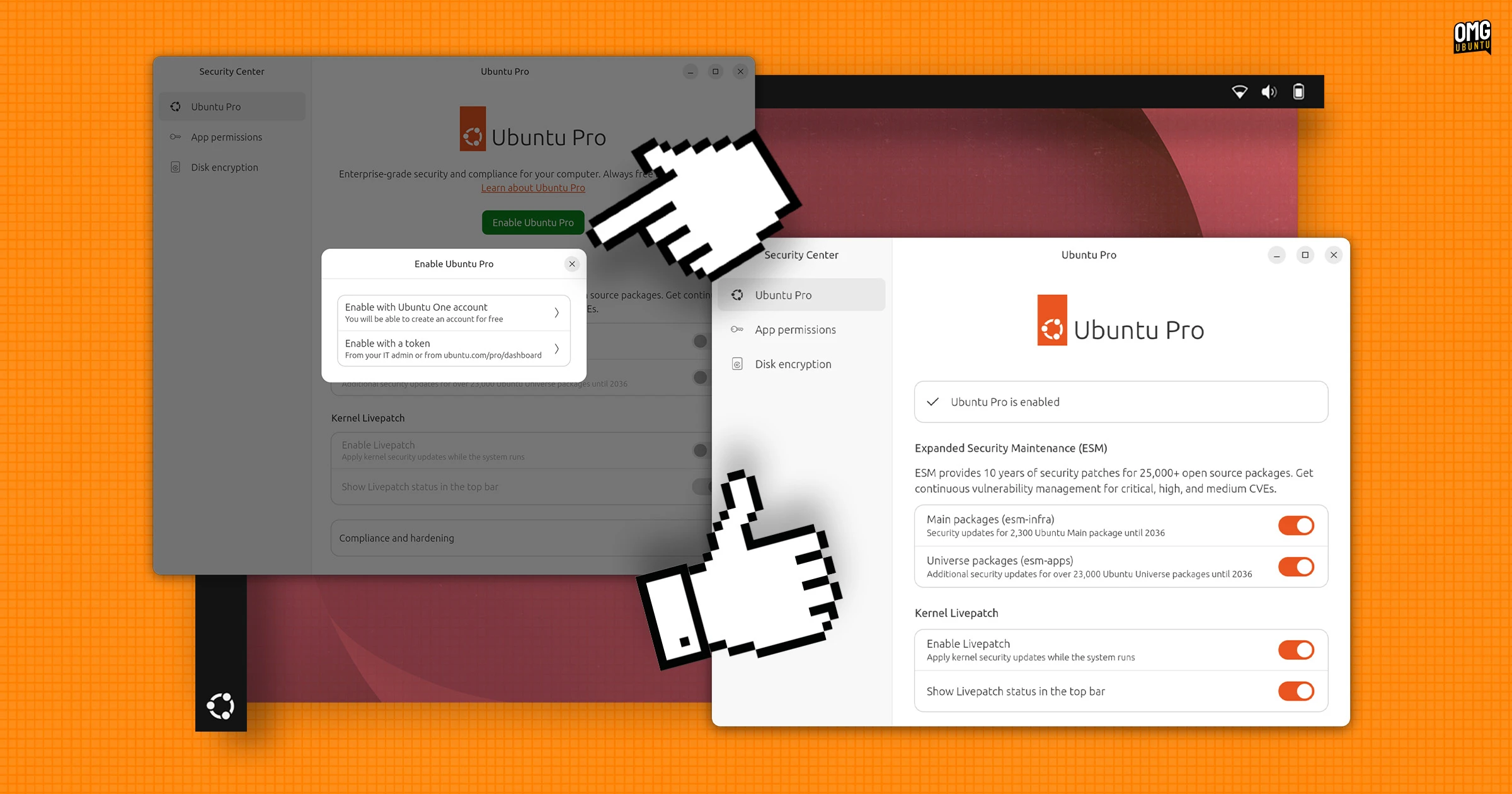
Another improvement is that the Security Center integrates real-time status indicators. If your subscription lapses or you approach the device limit, you’ll see a clear warning within the app—rather than relying on occasional terminal notifications or emails. This proactive design helps users stay on top of their security coverage without constant manual checks.
Of course, the core functionality hasn’t changed. You still get access to the same free or paid levels of service, the same extended security maintenance (ESM), and the same compliance tools. What has changed is the friction: the new setup is measurably faster and more transparent.
What This Means for Ubuntu Users
For the average Ubuntu desktop user, this change removes a small but persistent pain point. You no longer need to know that Ubuntu Pro settings exist inside the Software & Updates utility—they’re now in a logically named app (Security Center) that you’re likely already using to manage system firewalls, malware scans, and other protection layers. The consolidation makes sense: security subscription and security settings belong together.
For IT administrators rolling out Ubuntu across a fleet, the improved enrollment experience can cut down support time. Instead of walking users through a multi-tab navigation, you can simply instruct them to open Security Center and sign in. The interface’s clarity reduces the chance of errors—like entering a token in the wrong field or missing the free tier option entirely.
In summary, enabling Ubuntu Pro is now significantly easier than before. While the underlying service remains the same, Canonical’s decision to move Pro settings into Security Center and clean up the layout has made the setup process feel modern and approachable. Whether you’re a home user activating the free tier or an administrator linking dozens of machines, the improved flow means less time fiddling with settings and more time benefiting from enhanced security updates.